 100% Australian owned and operated

The short version
- Free Wix site: forward your domain to your full Wix address. People type your domain and land on your Wix site. URL forwarding is included with every Chill domain.
- Paid Wix plan: connect the domain inside Wix, then add the two records Wix gives you on your domain’s DNS page. Your own domain then stays in the address bar.
- Wix only connects a domain to a site on a paid plan. Its help pages say “connecting a custom domain requires upgrading to a plan”.
- When you forward, copy the whole Wix address, including the part after the slash. Leave it off and visitors get a Wix error page instead of your site.
- We’ll set up either one for you, at no charge.
Which way is yours?
| Free Wix site | Paid Wix plan | |
|---|---|---|
| What you do | Forward the domain to your Wix address | Connect the domain in Wix and add two DNS records |
| What visitors type | Your domain | Your domain |
| What the address bar shows once the site loads | The Wix address | Your domain |
| Cost with us | Nothing extra | Nothing extra |
| Your email | Not affected | Not affected, if you add records rather than change nameservers |
Not sure which plan you’re on? Your Wix account shows it. The address alone won’t tell you: Wix says upgrading doesn’t change a site’s address by itself, so a paid site keeps its wixsite.com address until a domain is connected.
Free Wix site: forward your domain
A forward is a signpost. Someone visits yourname.com.au, and our forwarding service sends their browser on to your Wix address. It takes a couple of minutes to set up.
1. Find your full Wix address
Wix describes a free site’s address as siteprefix.wixsite.com/siteaddress. It has two parts:
- the site prefix before
.wixsite.com, which Wix makes by default from the name on your Wix account, and - the site address after the slash, which is the name you gave the site when you first saved it.
The safest way to get it right is to open your published site in a browser and copy the address from the address bar. You need both parts.
The part after the slash matters. https://yourname.wixsite.com/yoursite is your site. https://yourname.wixsite.com on its own is not: when we tested one, Wix answered with a page-not-found error. And don’t add www in front. Wix says its free addresses “don’t use the ‘www’ prefix”, and the version with it won’t load.
2. Add the forward
Open URL forwarding
In your dashboard, open the domain and click URL forwarding.
Leave “From” empty
An empty From means the domain itself. Leave Also forward www ticked, so
www.yourname.com.augoes to the same place in the same step.Paste your Wix address into “To”
The whole thing, starting with
https://and ending with your site address.Leave the type on 301 Permanent
Then click Add forward.
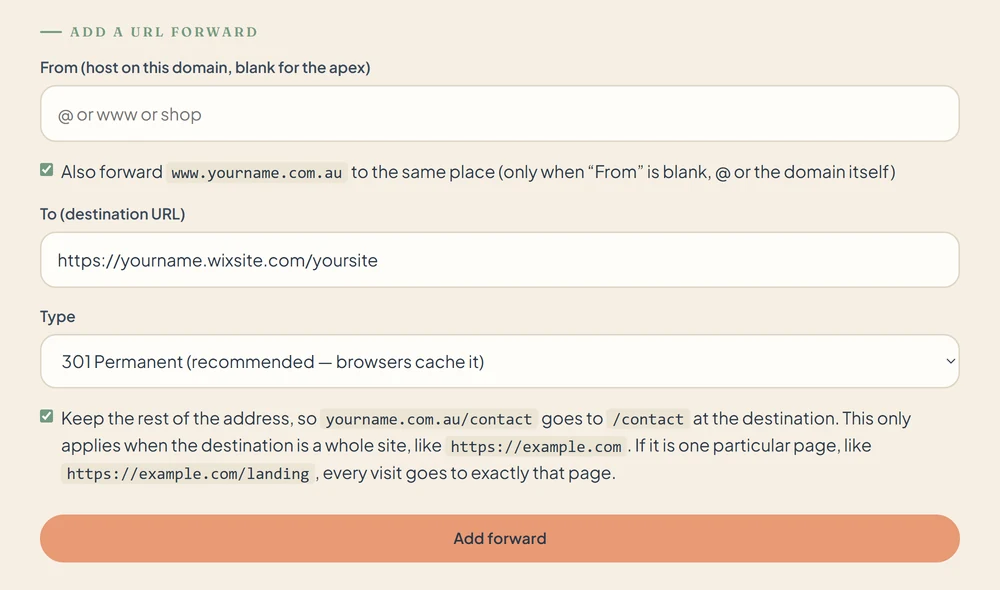
You’ll see a tick box called Keep the rest of the address. It’s for forwarding to a whole website, where /contact on your domain should go to /contact on the other one. A Wix address is one particular page, so we switch it off for you and every visit lands on your Wix site.
3. Test it
A new forward usually starts working within an hour or so, and the https:// versions can take a little longer. Try all four versions: http:// and https://, with and without www. Use a private window. If you tested before the forward was right, your browser may have remembered the old answer, and a private window ignores that.
What a forward does and doesn’t do
- The address bar changes to the Wix address once the site loads. A forward sends people on; it doesn’t rename the site.
- Search engines list the address the site lives at, which is the Wix one.
- Wix’s ads stay. Wix lists “removing the Wix ads” as a benefit of a paid plan.
- Your email isn’t touched. Forwarding a website only affects web browsers.
Paid Wix plan: connect the domain
On a paid plan, Wix can serve your site at your own domain, so yourname.com.au stays in the address bar. You tell Wix about the domain, Wix gives you two records, and you add them on your domain’s DNS page. Wix calls this the pointing method.
1. In Wix
Wix’s own steps, at the time of writing:
- Go to Domains in your Wix account and click Add an Existing Domain.
- Click Connect a domain you already own, choose your site and click Continue.
- Enter your domain and choose to connect it to your site.
- When Wix offers a manual setup, choose pointing, then Switch to Pointing Instructions.
Wix then shows the two records it wants:
| Type | Host | Value |
|---|---|---|
| A | @ | An IP address that Wix shows you |
| CNAME | www | pointing.wixdns.net |
Use the values from your own Wix screen. Wix’s own help pages show more than one IP address, so copy the one your Wix screen gives you rather than one from a guide. Wix says to add both records, or your site “will appear unsecure” and visitors may see a warning.
2. In your Chill dashboard
Remove any forward first
If the domain or its
wwwis forwarded, open URL forwarding and delete those forwards. A name can forward or point at Wix, not both.Open the DNS page
Open the domain and click Edit DNS records. If you see Switch to Chill DNS to edit records instead, click it and read what the Nameservers page says the domain is using now. If it says Holding page, leave Use our DNS hosting selected and click Save nameservers. If it lists another company’s nameservers, such as your web host’s or Cloudflare’s, stop: your records live with that company, so add Wix’s two records there instead. Switching would leave your existing website and email records behind.
Clear the way
Delete any
AorCNAMErecord that already exists for@orwww. They are the holding page or the old forward. LeaveMXandTXTrecords alone: they are your email. If you’ve switched on DNSSEC for this domain, turn it off first: Wix says it doesn’t support DNSSEC on a domain connected by pointing.Add Wix’s two records
Under Add a record, set Type to
A, Host to@and paste Wix’s IP address into Value. Then add a second record: TypeCNAME, Hostwww, Valuepointing.wixdns.net.Confirm in Wix
Go back to Wix and click I updated my records. Wix says the change can take up to 48 hours to be seen everywhere. It is often much quicker.
Pointing or nameservers?
Wix will also offer to connect a domain by nameservers. Its help page says it doesn’t recommend pointing in most cases, because it can’t help with DNS problems on records it doesn’t run. With nameservers, the domain’s DNS moves to Wix: every record, email included. Email forwarding and URL forwarding at Chill stop, and any mail records you had need setting up again there.
Pointing changes two records and leaves the rest where it is. If your domain has email on it, pointing is the smaller change. If you’d rather use Wix’s nameservers, open the domain in your dashboard, click Change nameservers, choose Custom nameservers, enter the ones Wix gives you and click Save nameservers. Nameservers and DNS zones explains the difference.
Starting free and upgrading later
Plenty of people start with the forward and connect the domain properly once the site earns a paid plan. Nothing is wasted: when you upgrade, delete the two forwards and follow the paid-plan steps above. The domain is the same one throughout, and everyone who has your address keeps landing on your site.
At Chill Domains. URL forwarding and DNS hosting are included with every domain. If you’d rather not do this yourself, reply to any of our emails with your Wix address, or with the two records Wix gave you, and we’ll set it up at no charge and tell you when it’s live.
Common questions
My domain shows a Wix page-not-found error. What went wrong?
Can my own domain stay in the address bar on a free Wix site?
I fixed the forward but I still get the old page. Why?
Does any of this affect my email?
Do I have to move my domain to Wix?
Can you set it up for me?
Sources
All read on 11 November 2026. Wix changes its screens and wording from time to time, so go by what your own Wix account shows.
- Changing your free Wix URL (Wix): the
siteprefix.wixsite.com/siteaddressformat, what each part is, that free addresses don’t use www, and that upgrading doesn’t change the address by itself. - Building a website for free (Wix): a custom domain needs a paid plan; removing the Wix ads is a paid-plan benefit.
- Connecting a domain to Wix using the pointing method (Wix): the steps in Wix, the A record for @ and the CNAME for www, the 48-hour note, that Wix doesn’t recommend pointing in most cases, and that it doesn’t support DNSSEC on a pointed domain.
- DNS records needed to connect your domain to Wix (Wix): the two records, and that a site must be upgraded before a domain can be connected.
Keep reading
- www or not? Redirects, forwarding and one real address: what a forward is, and when to use one.
- DNS records explained: what A and CNAME records do.
- Nameservers and DNS zones: who runs your domain’s records, and what changes when you move them.
- Email and your domain: why your mail keeps working when your website moves.